
Sort by Topics, Resources

Applications
Thank you! Your submission has been received!
Oops! Something went wrong while submitting the form.


Salto for

NetSuite
Articles
SHARE


Knuckles

June 8, 2026

5
min read

As a product team at Salto, we spend a lot of our time these days watching AI agents work on enterprise applications. The capabilities are remarkable: agents that can explain a workflow in plain language, trace a field across an entire account, or build a customization from a one-paragraph description. And NetSuite teams are noticing. The question we hear most often is no longer "can AI help with NetSuite?" but "how do I let it, without putting my account at risk?"
It is the right question. NetSuite is the system your company runs on. So before we talk about what AI can do for your NetSuite administration, let's talk about the rules that make it safe.
If your AI setup follows these four rules, the scary scenarios, from a destructive agent to a leaked credential, simply have no path to your account. The interesting part is that the same architecture that enforces these rules also makes the AI much better at the job.
At Salto, we transform your entire NetSuite configuration, including scripts, workflows, custom fields, forms, and saved searches, into code. We call the language NaCl, and it is designed to be readable by admins, not just developers.
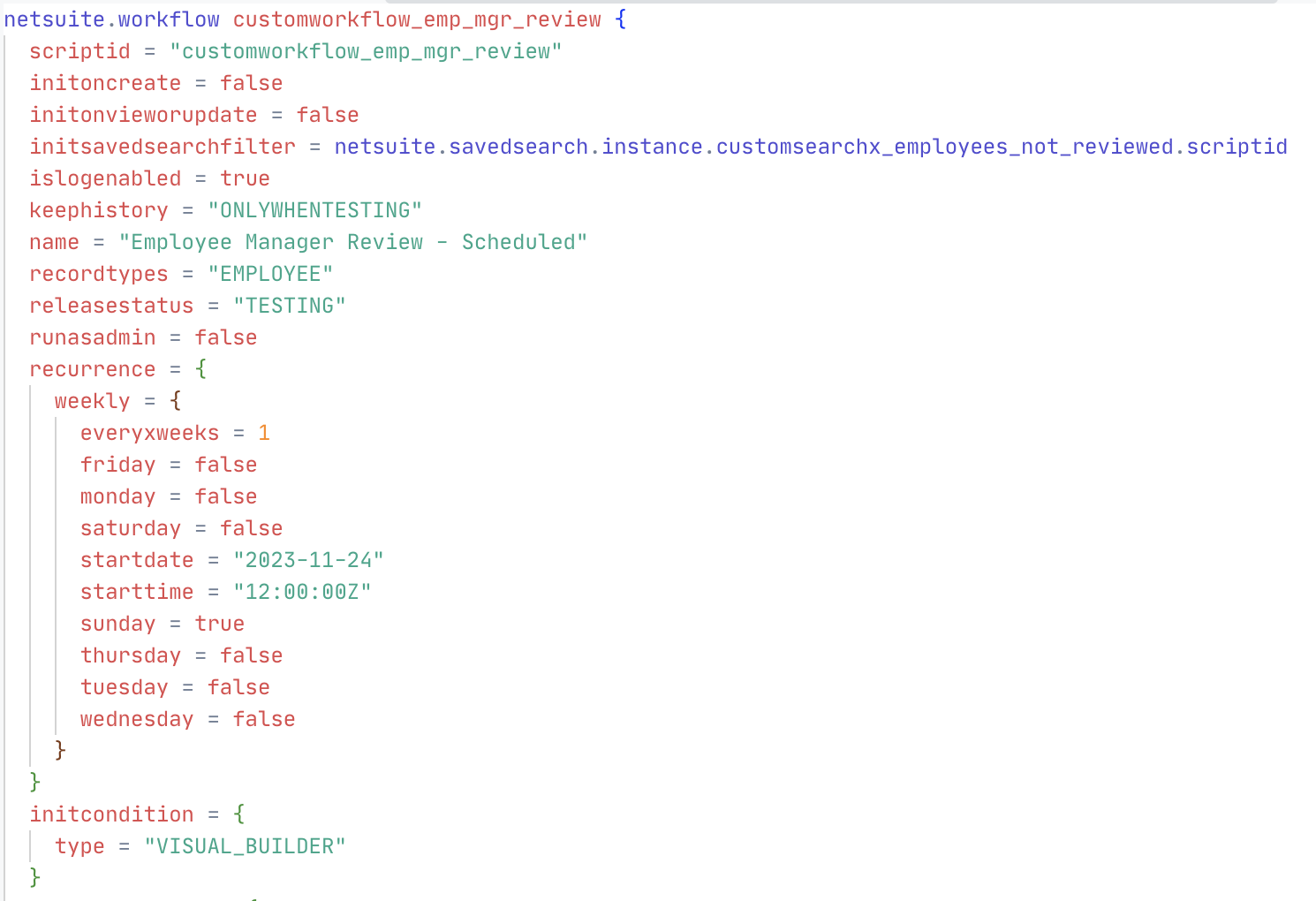
This is what makes the four rules practical. An AI agent like Claude Code works on the Salto workspace: it can see everything and touch nothing, because it holds no NetSuite credentials. Every change it proposes is a diff you review. Deployments go through Salto's normal flow, sandbox first, with approvals, full history, and rollback built in.
And it is also what makes the agent genuinely good at the work, for two reasons.
Better context. Text is the format AI understands best, and NaCl gives the agent your whole account in that format, with the relationships made explicit. References in the code connect each field to the forms, scripts, workflows, and saved searches that use it. When you ask "what happens if I change this field?", the agent does not guess. It follows the references and answers from your actual configuration.
Better feedback loop. Salto runs NetSuite-aware validations on every proposed change: broken references, account-specific values, dependency problems, deployment blockers. The agent gets that feedback immediately and corrects its own mistakes before a human ever reviews the proposal.
Better context plus a better feedback loop equals better results. And because the guardrails are the ones your team already uses in Salto for human changes, you stay in charge of every change that reaches your account.
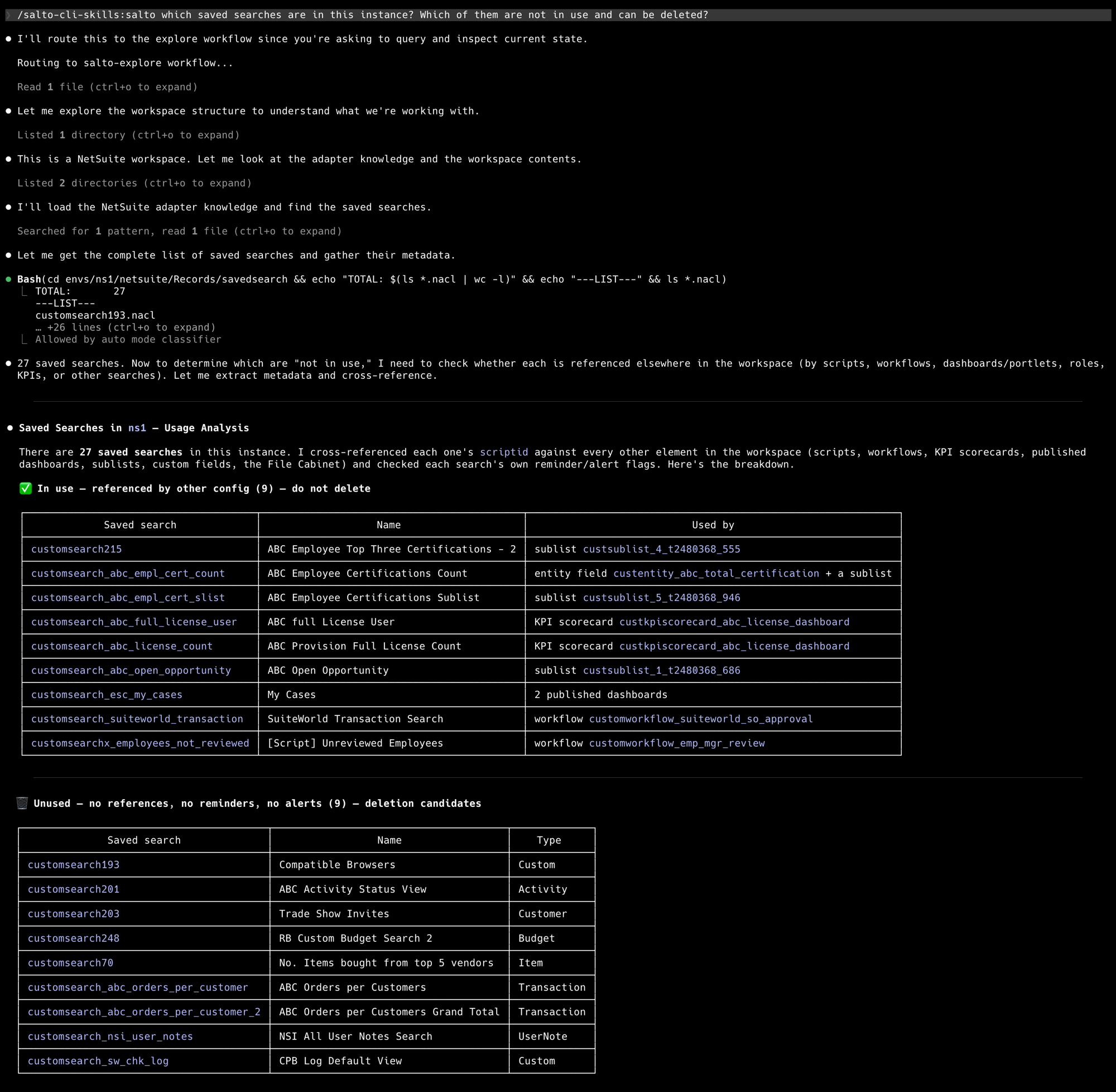
Imagine inheriting a NetSuite account with hundreds of customizations you did not build. Instead of reverse-engineering them one by one, ask the agent: what does this workflow actually do? Which scripts reference this field? Which of these saved searches are still in use, and which are safe to delete? In seconds, the agent cross-references each one against the rest of your configuration and answers, grounded in what is really there.
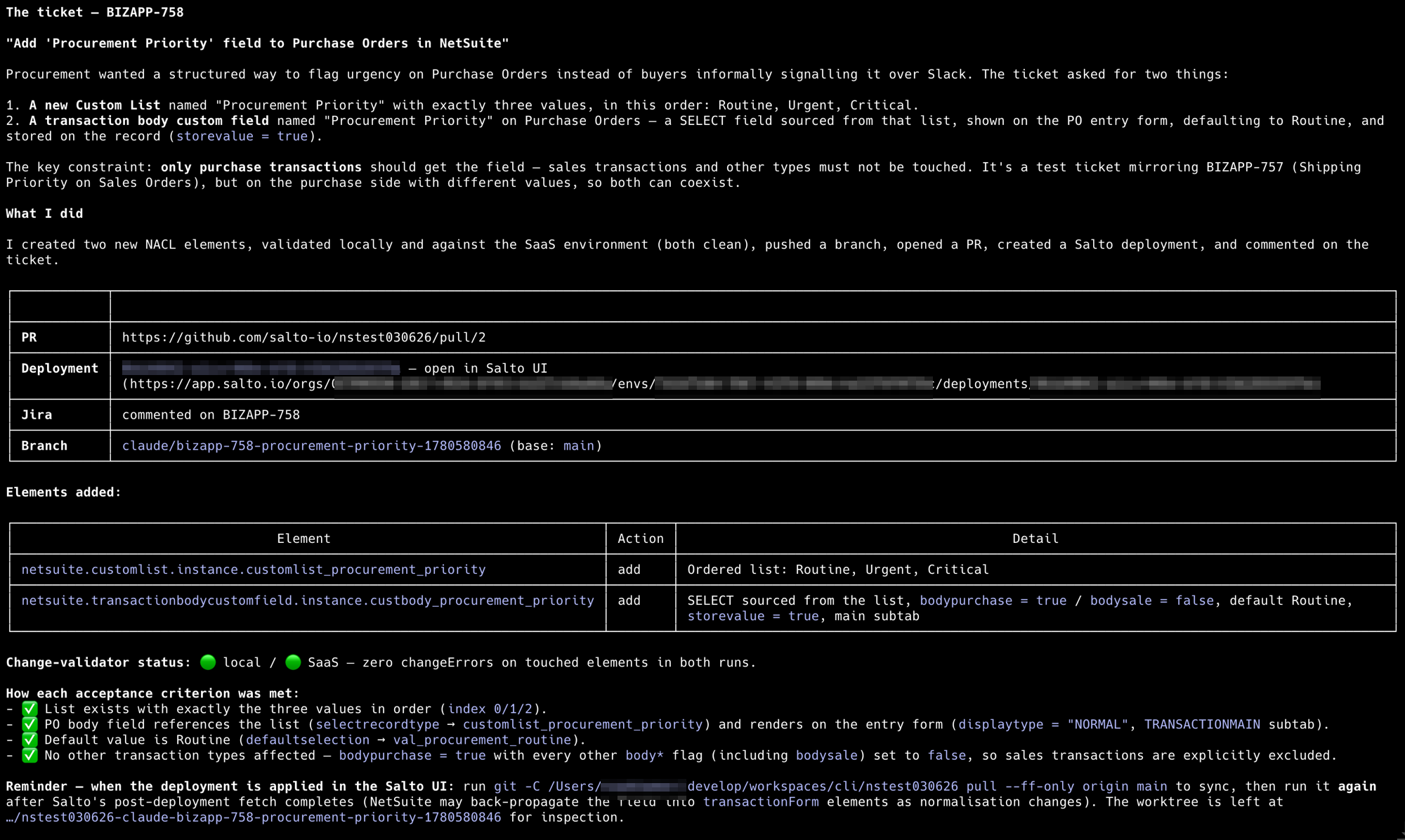
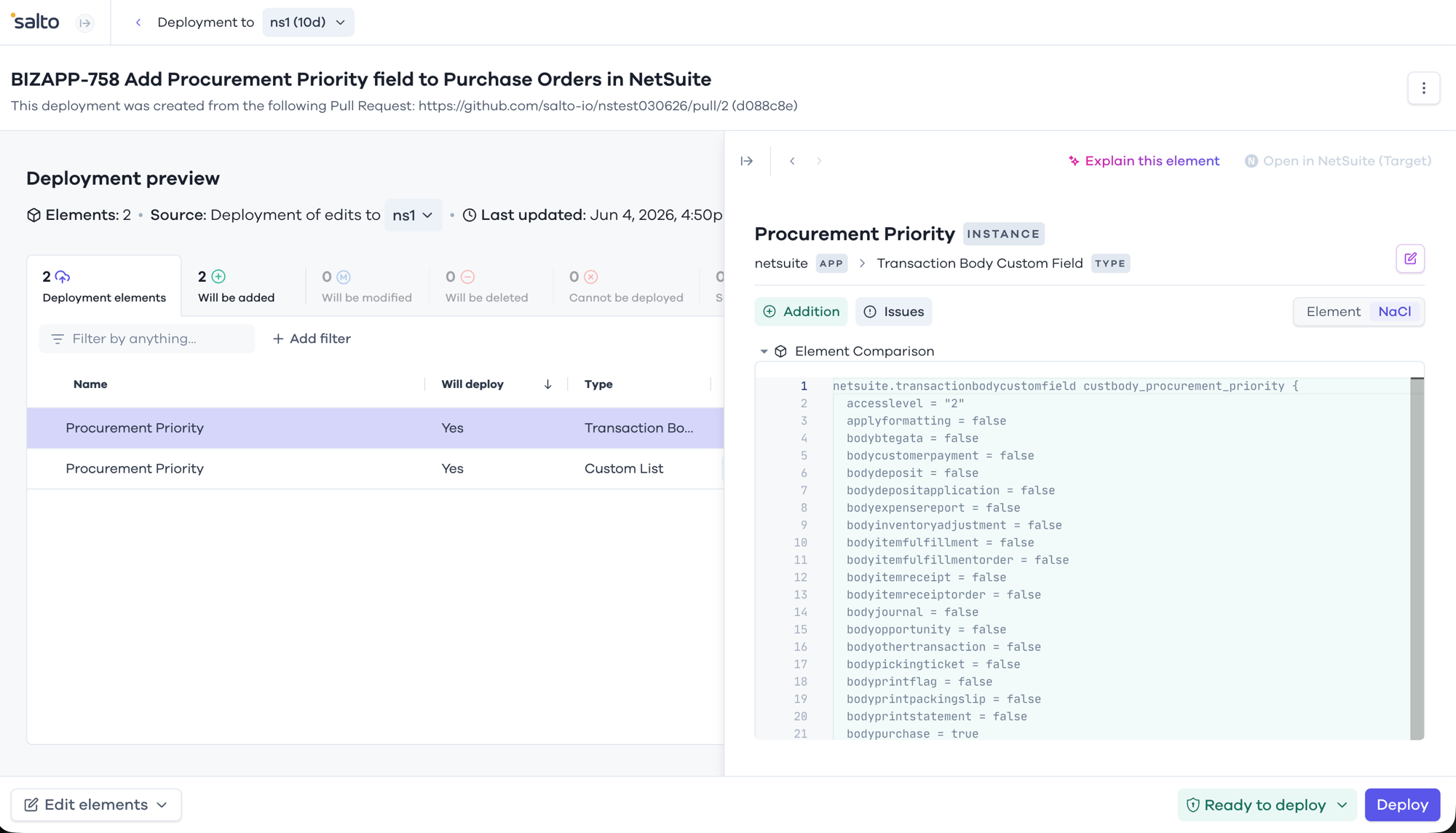
Or take implementation. Hand the agent a ticket, like "add a Procurement Priority field to Purchase Orders," and describe the customization in natural language. The agent drafts it in the workspace, Salto validations check it, you review the diff and approve, and the change deploys to your sandbox. Verify it there, then promote it to production. Every step recorded, every step reversible.
This is also where the agent meets the rest of your team: ask for the change from Slack, get the explanation in plain language, and let the review and deployment flow handle the rest.
We believe every NetSuite team should be working with AI agents today, the same way every engineering team now works with AI on its codebase. The teams that get the most out of it will not be the ones that gave their agent the broadest access. They will be the ones that gave it the best context, the fastest feedback, and the clearest guardrails.
That combination is what we have built at Salto: your NetSuite as code, agents that understand it deeply, validations that check every change, and a deployment process that keeps humans in charge. If you want to see it on your own account, try Salto at salto.io.
How do I undo a change an AI agent made in NetSuite?
If your configuration is versioned, you restore the previous version and redeploy, which takes minutes. Salto keeps an automatic changelog of every change, lets you revert an entire deployment, and can restore an environment to a prior backup captured during a scheduled fetch. Without versioning, undoing a change means manually reconstructing what an element used to look like from memory.
What is NaCl, and why does it matter for AI in NetSuite?
NaCl is the readable code language Salto uses to represent your entire NetSuite configuration, including scripts, workflows, custom fields, forms, and saved searches. Because it writes out the references between elements explicitly, an AI agent can trace how a field connects to the forms, scripts, and searches that use it and answer questions grounded in your actual setup instead of guessing.
Can AI implement a NetSuite customization end to end, safely?
Yes, when the workflow keeps a human in the loop. An agent can turn a plain-language ticket into a drafted customization, have Salto run NetSuite-aware validations for broken references and dependency problems, and stage it for review, but the change only reaches your sandbox after a person approves the diff, and only reaches production after it's been verified there.
Can an AI agent access NetSuite directly?
Not safely, no. Direct access means the agent holds real credentials to your live account, and NetSuite's REST-based permissions tend to be broad, so it's difficult to guarantee that an agent granted read access can't also write. Salto's approach avoids the problem architecturally: the agent works against a code representation of your configuration, never the account itself, so there's no credential to leak or misuse in the first place.

WRITTEN BY OUR EXPERT
Knuckles
Chief Content Beaver
Knuckles is a curious Business Engineer who loves to explore all things business applications.


© Copyright Salto 2026 | Various trademarks held by their respective owners
Salto for
NetSuite
NetSuite
SHARE
Knuckles
June 8, 2026
5
min read
As a product team at Salto, we spend a lot of our time these days watching AI agents work on enterprise applications. The capabilities are remarkable: agents that can explain a workflow in plain language, trace a field across an entire account, or build a customization from a one-paragraph description. And NetSuite teams are noticing. The question we hear most often is no longer "can AI help with NetSuite?" but "how do I let it, without putting my account at risk?"
It is the right question. NetSuite is the system your company runs on. So before we talk about what AI can do for your NetSuite administration, let's talk about the rules that make it safe.
If your AI setup follows these four rules, the scary scenarios, from a destructive agent to a leaked credential, simply have no path to your account. The interesting part is that the same architecture that enforces these rules also makes the AI much better at the job.
At Salto, we transform your entire NetSuite configuration, including scripts, workflows, custom fields, forms, and saved searches, into code. We call the language NaCl, and it is designed to be readable by admins, not just developers.
This is what makes the four rules practical. An AI agent like Claude Code works on the Salto workspace: it can see everything and touch nothing, because it holds no NetSuite credentials. Every change it proposes is a diff you review. Deployments go through Salto's normal flow, sandbox first, with approvals, full history, and rollback built in.
And it is also what makes the agent genuinely good at the work, for two reasons.
Better context. Text is the format AI understands best, and NaCl gives the agent your whole account in that format, with the relationships made explicit. References in the code connect each field to the forms, scripts, workflows, and saved searches that use it. When you ask "what happens if I change this field?", the agent does not guess. It follows the references and answers from your actual configuration.
Better feedback loop. Salto runs NetSuite-aware validations on every proposed change: broken references, account-specific values, dependency problems, deployment blockers. The agent gets that feedback immediately and corrects its own mistakes before a human ever reviews the proposal.
Better context plus a better feedback loop equals better results. And because the guardrails are the ones your team already uses in Salto for human changes, you stay in charge of every change that reaches your account.
Imagine inheriting a NetSuite account with hundreds of customizations you did not build. Instead of reverse-engineering them one by one, ask the agent: what does this workflow actually do? Which scripts reference this field? Which of these saved searches are still in use, and which are safe to delete? In seconds, the agent cross-references each one against the rest of your configuration and answers, grounded in what is really there.
Or take implementation. Hand the agent a ticket, like "add a Procurement Priority field to Purchase Orders," and describe the customization in natural language. The agent drafts it in the workspace, Salto validations check it, you review the diff and approve, and the change deploys to your sandbox. Verify it there, then promote it to production. Every step recorded, every step reversible.
This is also where the agent meets the rest of your team: ask for the change from Slack, get the explanation in plain language, and let the review and deployment flow handle the rest.
We believe every NetSuite team should be working with AI agents today, the same way every engineering team now works with AI on its codebase. The teams that get the most out of it will not be the ones that gave their agent the broadest access. They will be the ones that gave it the best context, the fastest feedback, and the clearest guardrails.
That combination is what we have built at Salto: your NetSuite as code, agents that understand it deeply, validations that check every change, and a deployment process that keeps humans in charge. If you want to see it on your own account, try Salto at salto.io.
© Copyright Salto 2026 | Various trademarks held by their respective owners


