
Sort by Topics, Resources

Applications
Thank you! Your submission has been received!
Oops! Something went wrong while submitting the form.


Salto for

Salesforce
Articles
SHARE


Knuckles

June 15, 2026

6
min read

Every conversation about Salesforce and AI is about your reps and your customers. Einstein forecasts the pipeline, drafts the follow-up email, scores the lead. Agentforce answers the customer and works the case. It is all pointed at the front line, and a lot of it is genuinely useful. But ask any Salesforce admin what actually eats their week, and it is not writing emails. It is the org.
It is the hundreds of custom fields nobody has documented, half of them probably unused. It is the validation rule that fires for reasons no one remembers. It is the field you are scared to delete because "Where is this used?" never tells you the whole truth, so you leave it, and the clutter grows. It is the flow that touches six objects, and the new admin who needs to understand an org that lives only in one person's head. That work is unglamorous, it is constant, and it is exactly the kind of thing AI is good at. And almost no one is pointing AI at it.
This is the AI Salesforce admins actually want: not another assistant for the person closing a deal, but an assistant for the person who has to keep the whole org running. Here is what that looks like, and how to use it without putting your org at risk.
The AI Salesforce puts in front of you is pointed at the front line. Einstein and Agentforce live where reps and customers live, and they are sold and priced that way. Some of it earns its keep. But none of it helps you manage the configuration: the fields, layouts, picklists, validation rules, flows, profiles, and sharing rules that decide how the whole org behaves.
The admin side has the opposite problem. There is no shortage of work AI could take off your plate, and no tool offering to do it: understanding what is in the org, checking what a change will break before you make it, cleaning up fields that have not been used in years, editing dozens of picklists or rules without dozens of clicks. This is the gap, and it is where AI is most valuable.
Four kinds of admin work map almost perfectly onto what a capable AI agent does well.
None of this is for the rep closing a deal. None of it is what Einstein was built for. It is the boring, high-stakes work that keeps a Salesforce org healthy, and it is finally something you can hand off.
Here is the catch. An AI agent is only as good as the context it has and the feedback it gets. Point it at Setup through the API and it is working blind, one object at a time, with no way to see how anything connects. That is how you get confident, wrong answers.
At Salto, we represent your entire Salesforce configuration, including objects, custom fields, picklists, layouts, validation rules, flows, profiles, permission sets, and sharing rules, as code, in a readable language we call NaCl. Every relationship between elements is explicit in the text.
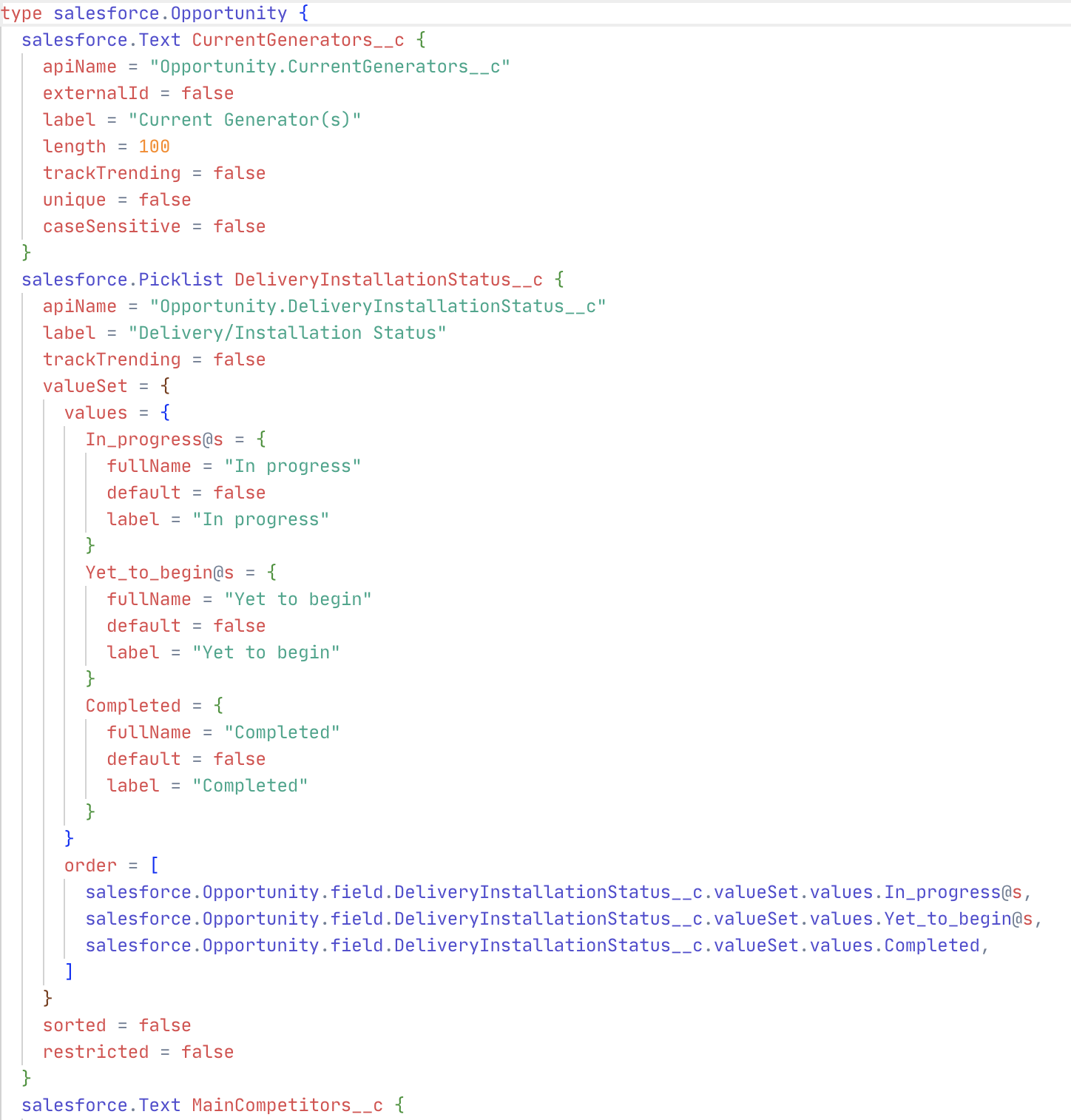
This changes what the agent can do, for two reasons. First, context: the whole org is in the one format AI understands best, with the connections spelled out, so when you ask what depends on a field, the agent follows the references instead of guessing. Second, a feedback loop: Salto runs Salesforce-aware validations on every proposed change and catches broken references and dependency problems immediately, so the agent corrects its own mistakes before you ever see the result.
Better context plus faster feedback is why the same agent that flails against the API does genuinely useful work against your configuration as code. It is also the version control and safe sandbox-to-production deployment that Salesforce never gave you natively.
The number one objection admins raise about any tool that touches their org is trust. Would you let a third-party app, let alone an AI, read and change the system your whole revenue runs on? It is the right instinct.
The safe pattern is to never give the agent the keys. It works on your Salto workspace, a versioned copy of your configuration, not on your live org, and it holds no Salesforce credentials. Every change it proposes is a readable diff that a human reviews and approves before anything is applied. Changes deploy through Salto's normal flow, sandbox first, with full history and one-click rollback. The agent can see everything and change nothing on its own.
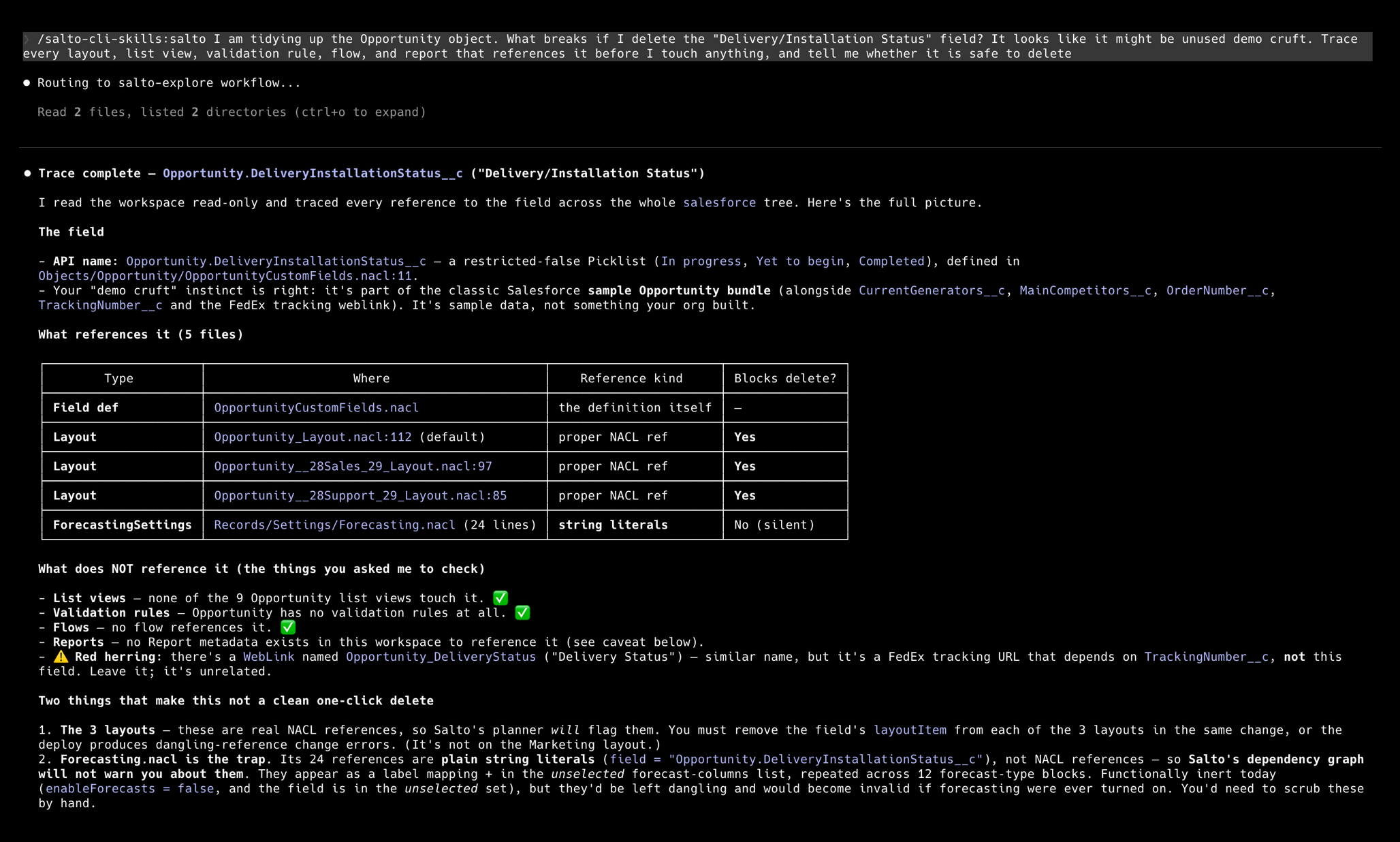
Say you are tidying up the Opportunity object and you reach a field called "Delivery/Installation Status." You are not sure anyone still uses it. Before you delete it, you ask the agent: what breaks if I remove this field? In seconds it traces what Setup scatters across a dozen screens. The field is a picklist on three different Opportunity page layouts, Sales, Support, and the default, so deleting it edits all three and permanently drops whatever reps have stored in it. It is not cruft. It is in active use.
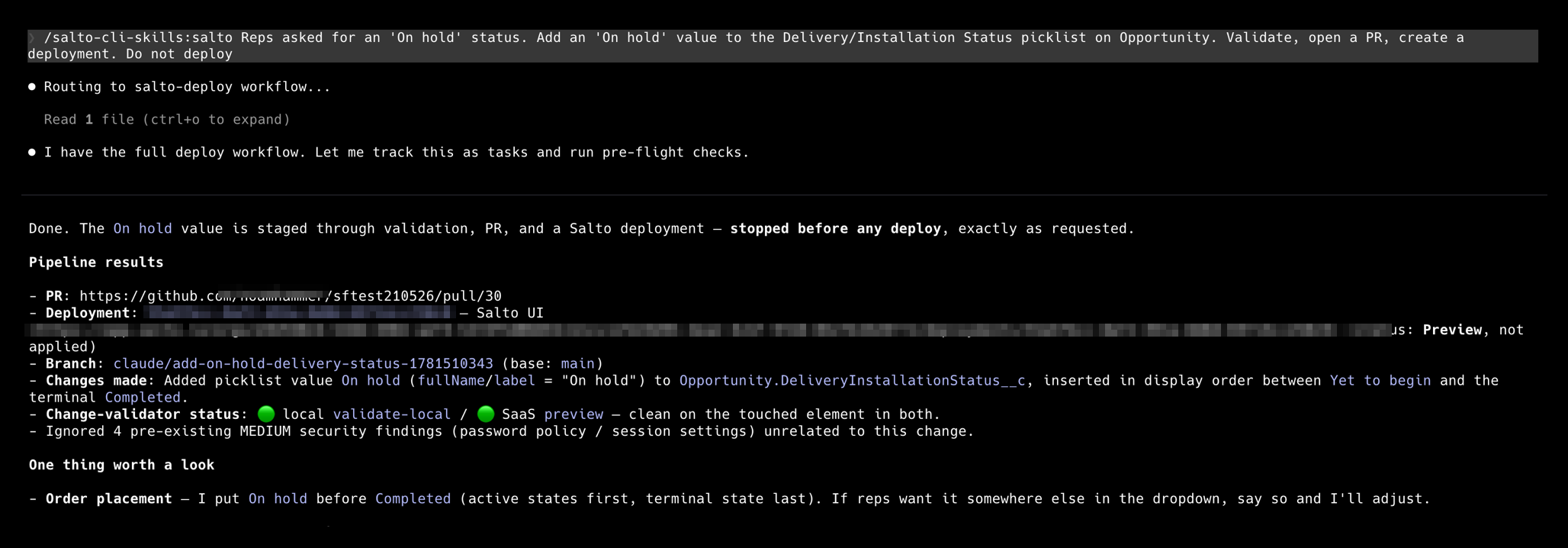
So the field stays. And in fact the reason you were in there is the opposite of cleanup: your reps asked for an "On hold" status that the picklist does not have yet. So instead of deleting anything, you make the change they wanted. You tell the agent to add an "On hold" value to the Delivery/Installation Status picklist. The agent edits the field's value set, runs the validations, and opens a pull request, all without touching your org.
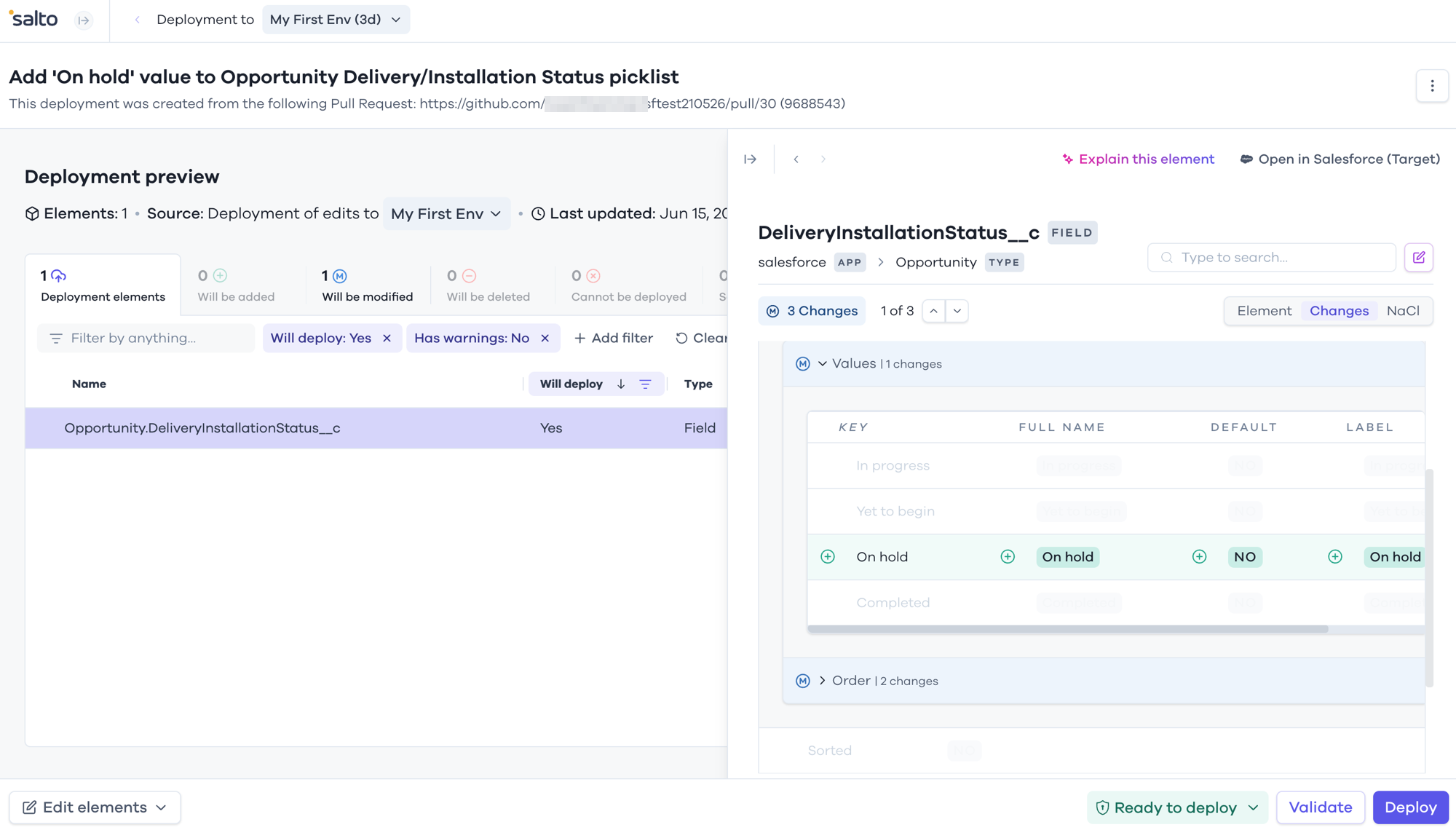
You review the exact edit in Salto before anything happens. The new picklist value shows up as a clean diff, the validations are green, and nothing reaches your org until you deploy, sandbox first.
Every step is recorded, every step is reversible, and a human signs off on every change that reaches your org.
Salesforce has spent its AI budget on the front line, and that is fine, your reps and your customers matter. But the person keeping the org running, the one who inherited hundreds of fields, a tangle of rules, and no safe way to tell what a change will break, has been handed nothing. Configuration as code, an agent that understands it, validations that check every change, and a sandbox-first deploy flow that keeps you in control: that is what AI for the admin actually looks like. If you want to see it on your own org, try Salto at salto.io.
Does Agentforce help Salesforce admins manage their org?
No. Agentforce and Einstein are built for reps and customers, not for managing configuration like fields, layouts, picklists, validation rules, and flows. Admins need a different kind of AI, one that reads the org configuration as code, traces dependencies, and proposes changes as reviewable diffs, which is what Salto provides.
What can AI do for a Salesforce admin day to day?
Four things: explain the org in plain language, run impact analysis before any change, find dead configuration like unused fields and picklist values, and apply bulk edits consistently across the org. It works because the agent operates on a text-based copy of the full configuration instead of clicking through Setup.
How do I check what breaks before deleting a field in my Salesforce org?
Salesforce's "Where is this used?" is incomplete and misses flows, Apex, and reports. Salto makes every reference in the org explicit, so you can trace exactly which layouts, rules, flows, and reports depend on a field before deleting it, in seconds instead of guesswork.
Is it safe to let an AI agent make changes to a Salesforce org?
Yes, if the agent never gets the keys. In Salto the AI works on a versioned copy of the configuration, holds no Salesforce credentials, and every change is a human-reviewed diff deployed sandbox-first with one-click rollback. The agent can see everything and change nothing on its own.

WRITTEN BY OUR EXPERT
Knuckles
Chief Content Beaver
Knuckles is a curious Business Engineer who loves to explore all things business applications.


© Copyright Salto 2025 | Various trademarks held by their respective owners
Salto for
Salesforce
Salesforce
SHARE
Knuckles
June 15, 2026
6
min read
Every conversation about Salesforce and AI is about your reps and your customers. Einstein forecasts the pipeline, drafts the follow-up email, scores the lead. Agentforce answers the customer and works the case. It is all pointed at the front line, and a lot of it is genuinely useful. But ask any Salesforce admin what actually eats their week, and it is not writing emails. It is the org.
It is the hundreds of custom fields nobody has documented, half of them probably unused. It is the validation rule that fires for reasons no one remembers. It is the field you are scared to delete because "Where is this used?" never tells you the whole truth, so you leave it, and the clutter grows. It is the flow that touches six objects, and the new admin who needs to understand an org that lives only in one person's head. That work is unglamorous, it is constant, and it is exactly the kind of thing AI is good at. And almost no one is pointing AI at it.
This is the AI Salesforce admins actually want: not another assistant for the person closing a deal, but an assistant for the person who has to keep the whole org running. Here is what that looks like, and how to use it without putting your org at risk.
The AI Salesforce puts in front of you is pointed at the front line. Einstein and Agentforce live where reps and customers live, and they are sold and priced that way. Some of it earns its keep. But none of it helps you manage the configuration: the fields, layouts, picklists, validation rules, flows, profiles, and sharing rules that decide how the whole org behaves.
The admin side has the opposite problem. There is no shortage of work AI could take off your plate, and no tool offering to do it: understanding what is in the org, checking what a change will break before you make it, cleaning up fields that have not been used in years, editing dozens of picklists or rules without dozens of clicks. This is the gap, and it is where AI is most valuable.
Four kinds of admin work map almost perfectly onto what a capable AI agent does well.
None of this is for the rep closing a deal. None of it is what Einstein was built for. It is the boring, high-stakes work that keeps a Salesforce org healthy, and it is finally something you can hand off.
Here is the catch. An AI agent is only as good as the context it has and the feedback it gets. Point it at Setup through the API and it is working blind, one object at a time, with no way to see how anything connects. That is how you get confident, wrong answers.
At Salto, we represent your entire Salesforce configuration, including objects, custom fields, picklists, layouts, validation rules, flows, profiles, permission sets, and sharing rules, as code, in a readable language we call NaCl. Every relationship between elements is explicit in the text.
This changes what the agent can do, for two reasons. First, context: the whole org is in the one format AI understands best, with the connections spelled out, so when you ask what depends on a field, the agent follows the references instead of guessing. Second, a feedback loop: Salto runs Salesforce-aware validations on every proposed change and catches broken references and dependency problems immediately, so the agent corrects its own mistakes before you ever see the result.
Better context plus faster feedback is why the same agent that flails against the API does genuinely useful work against your configuration as code. It is also the version control and safe sandbox-to-production deployment that Salesforce never gave you natively.
The number one objection admins raise about any tool that touches their org is trust. Would you let a third-party app, let alone an AI, read and change the system your whole revenue runs on? It is the right instinct.
The safe pattern is to never give the agent the keys. It works on your Salto workspace, a versioned copy of your configuration, not on your live org, and it holds no Salesforce credentials. Every change it proposes is a readable diff that a human reviews and approves before anything is applied. Changes deploy through Salto's normal flow, sandbox first, with full history and one-click rollback. The agent can see everything and change nothing on its own.
Say you are tidying up the Opportunity object and you reach a field called "Delivery/Installation Status." You are not sure anyone still uses it. Before you delete it, you ask the agent: what breaks if I remove this field? In seconds it traces what Setup scatters across a dozen screens. The field is a picklist on three different Opportunity page layouts, Sales, Support, and the default, so deleting it edits all three and permanently drops whatever reps have stored in it. It is not cruft. It is in active use.
So the field stays. And in fact the reason you were in there is the opposite of cleanup: your reps asked for an "On hold" status that the picklist does not have yet. So instead of deleting anything, you make the change they wanted. You tell the agent to add an "On hold" value to the Delivery/Installation Status picklist. The agent edits the field's value set, runs the validations, and opens a pull request, all without touching your org.
You review the exact edit in Salto before anything happens. The new picklist value shows up as a clean diff, the validations are green, and nothing reaches your org until you deploy, sandbox first.
Every step is recorded, every step is reversible, and a human signs off on every change that reaches your org.
Salesforce has spent its AI budget on the front line, and that is fine, your reps and your customers matter. But the person keeping the org running, the one who inherited hundreds of fields, a tangle of rules, and no safe way to tell what a change will break, has been handed nothing. Configuration as code, an agent that understands it, validations that check every change, and a sandbox-first deploy flow that keeps you in control: that is what AI for the admin actually looks like. If you want to see it on your own org, try Salto at salto.io.
© Copyright Salto 2025 | Various trademarks held by their respective owners


