
Sort by Topics, Resources

Applications
Thank you! Your submission has been received!
Oops! Something went wrong while submitting the form.


Salto for

Zendesk
Articles
SHARE


Knuckles

June 9, 2026

5
min read

Every conversation about Zendesk and AI lately is about your customers. Answer bots that deflect tickets, reply suggestions for your agents, copilots that summarize a conversation. It is all pointed at the front line, and most of it is sold per agent. Some of it is genuinely useful. But ask any Zendesk admin what actually eats their week, and it is not writing replies. It is the configuration.
It is the 500 triggers nobody has documented. The macro list that quietly grew into the thousands. The change you are nervous to make because you cannot see what depends on what. The new hire who needs to understand an instance that lives only in one person's head. That work is unglamorous, it is constant, and it is exactly the kind of thing AI is good at. And almost no one is pointing AI at it.
This is the AI Zendesk admins actually want: not another feature for your customers, but an assistant for the person who has to keep the whole instance running. Here is what that looks like, and how to use it without putting your instance at risk.
The AI Zendesk puts in front of you is customer-facing and metered. You pay for it per agent, and if you have ten agents, you buy ten seats of it. Admins in the community have been blunt about the results, calling the drafted replies underwhelming and the tone features filler. Whether or not that is fair, it misses the point: none of it helps you manage the configuration.
The admin side has the opposite problem. There is no shortage of work AI could take off your plate, and no tool offering to do it: understanding what is in the instance, checking what a change will break before you make it, cleaning up config that has not done anything in years, editing hundreds of macros without hundreds of clicks. This is the gap, and it is where AI is most valuable.
Four kinds of admin work map almost perfectly onto what a capable AI agent does well.
None of this is customer-facing. None of it is priced per agent. It is the boring, high-stakes work that keeps a Zendesk instance healthy, and it is finally something you can hand off.
Here is the catch. An AI agent is only as good as the context it has and the feedback it gets. Point it at the Zendesk Admin UI through the API and it is working blind, one object at a time, with no way to see how anything connects. That is how you get confident, wrong answers.
At Salto, we represent your entire Zendesk configuration, including triggers, automations, macros, views, forms, fields, groups, and SLA policies, as code, in a readable language we call NaCl. Every relationship between elements is explicit in the text.
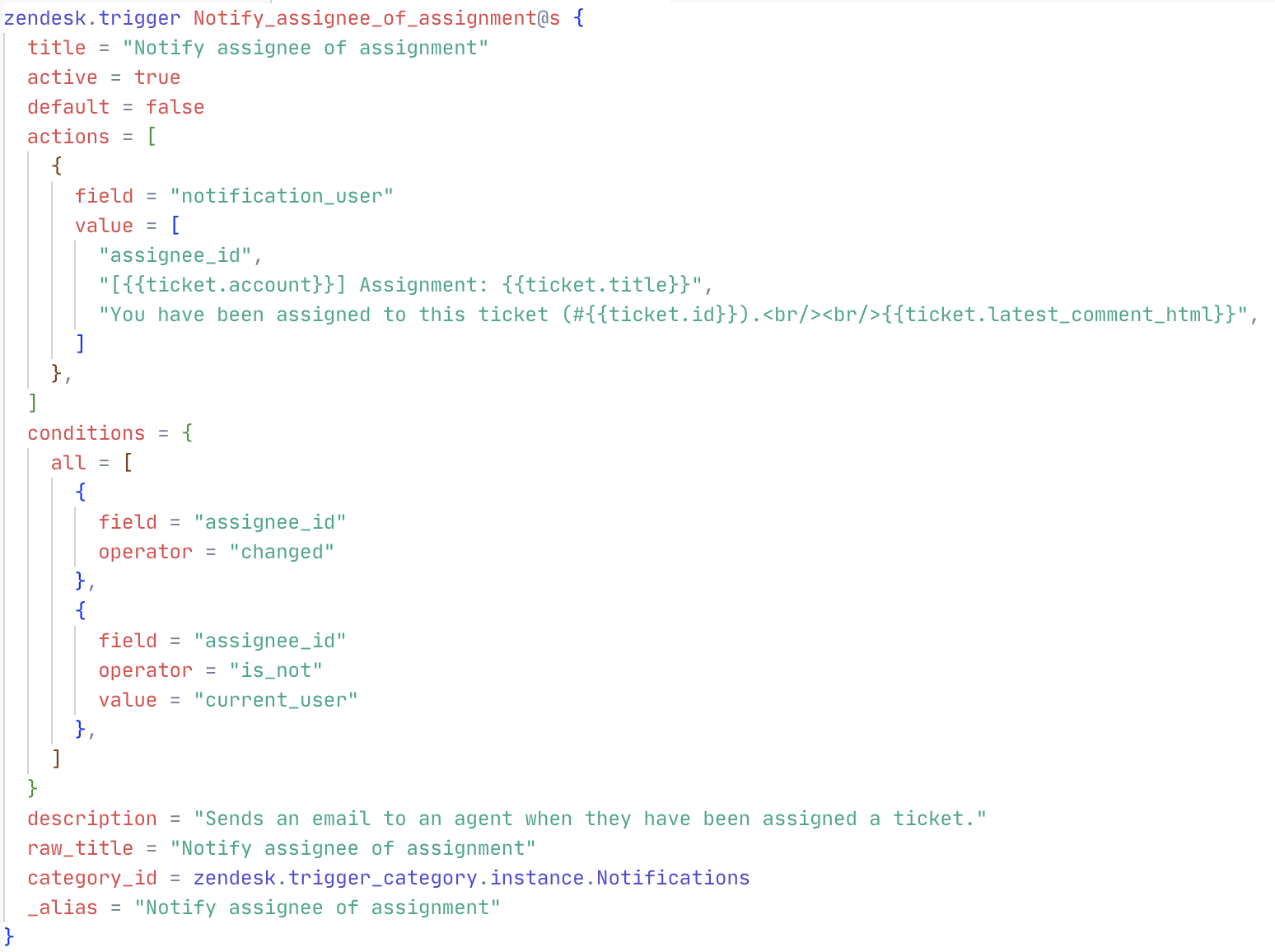
This changes what the agent can do, for two reasons. First, context: the whole instance is in the one format AI understands best, with the connections spelled out, so when you ask what depends on a trigger, the agent follows the references instead of guessing. Second, a feedback loop: Salto runs Zendesk-aware validations on every proposed change and catches broken references and dependency problems immediately, so the agent corrects its own mistakes before you ever see the result.
Better context plus faster feedback is why the same agent that flails against the API does genuinely useful work against your configuration as code.
The number one objection admins raise about any tool that touches their config is trust. Would you let a third-party app, let alone an AI, read and change your instance? It is the right instinct.
The safe pattern is to never give the agent the keys. It works on your Salto workspace, a versioned copy of your configuration, not on your live Zendesk, and it holds no Zendesk credentials. Every change it proposes is a readable diff that a human reviews and approves before anything is applied. Changes deploy through Salto's normal flow, with full history and one-click rollback. The agent can see everything and change nothing on its own.
Say you want to disable a trigger you are not sure is still doing anything. Before you touch it, you ask the agent: what would break if I disabled the "Set tickets with no priority to normal" trigger? In seconds it traces a dependency the Zendesk UI never shows you. The trigger sets new tickets to normal priority, and your first-reply-time SLA policy only applies to normal-priority tickets. Disable the trigger and that SLA quietly stops applying to every new ticket, with no error and nothing turning red.
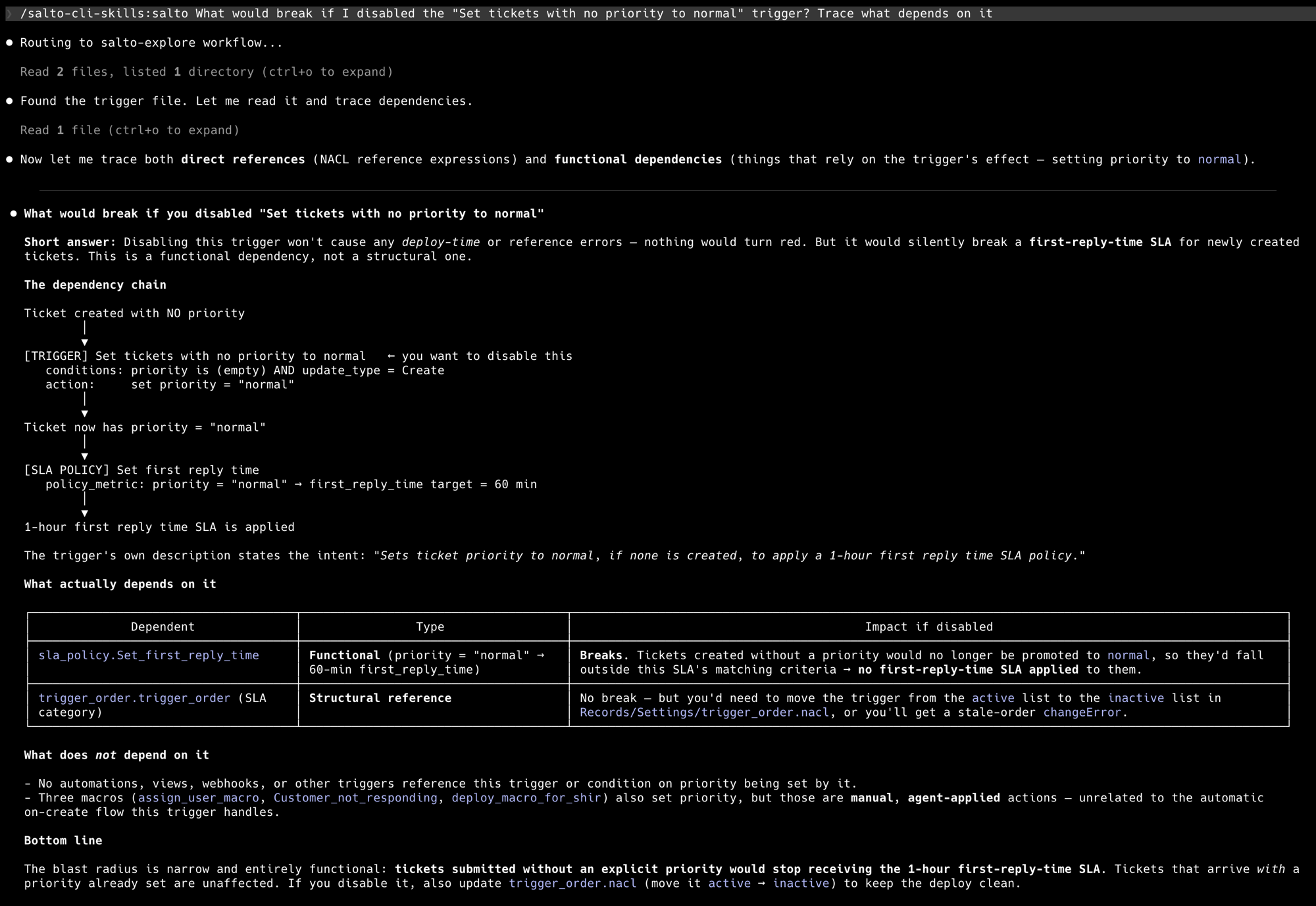
Now you know the trigger is load-bearing, so instead of disabling it you harden it. You tell the agent to make it also apply to reopened tickets, not just newly created ones, so a reopened ticket with no priority still picks up the SLA. The agent works out how this workspace expresses a reopen, edits the trigger's conditions, runs the validations, and opens a pull request, all without touching your instance.
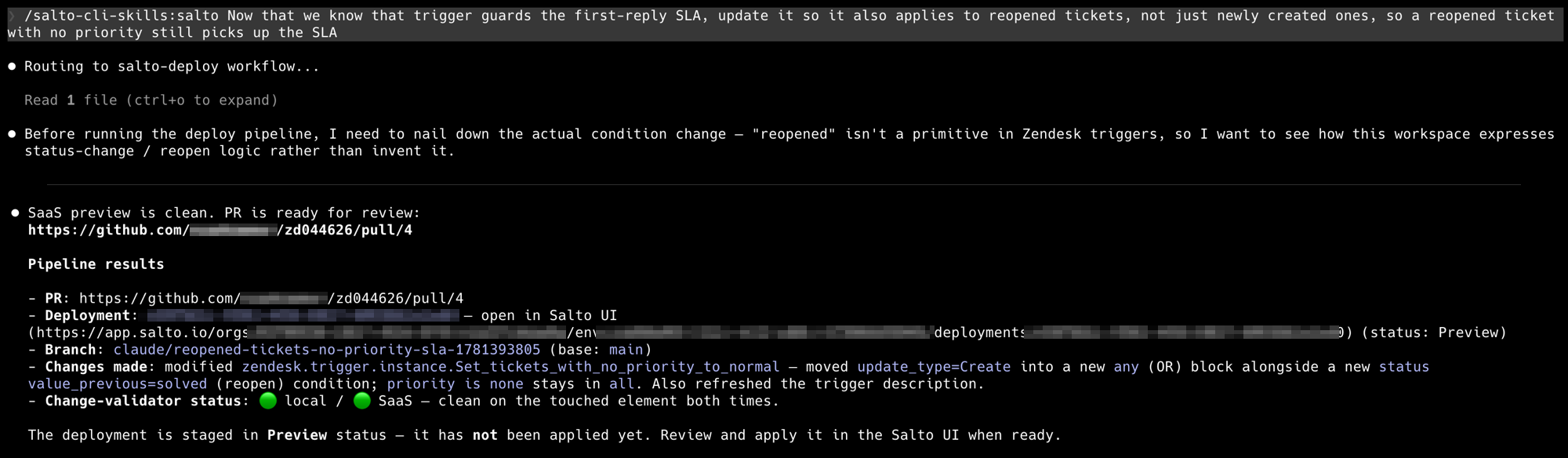
You review the exact edit in Salto before anything happens. The trigger's new condition shows up as a clean diff, the validations are green, and nothing reaches your instance until you click Deploy.
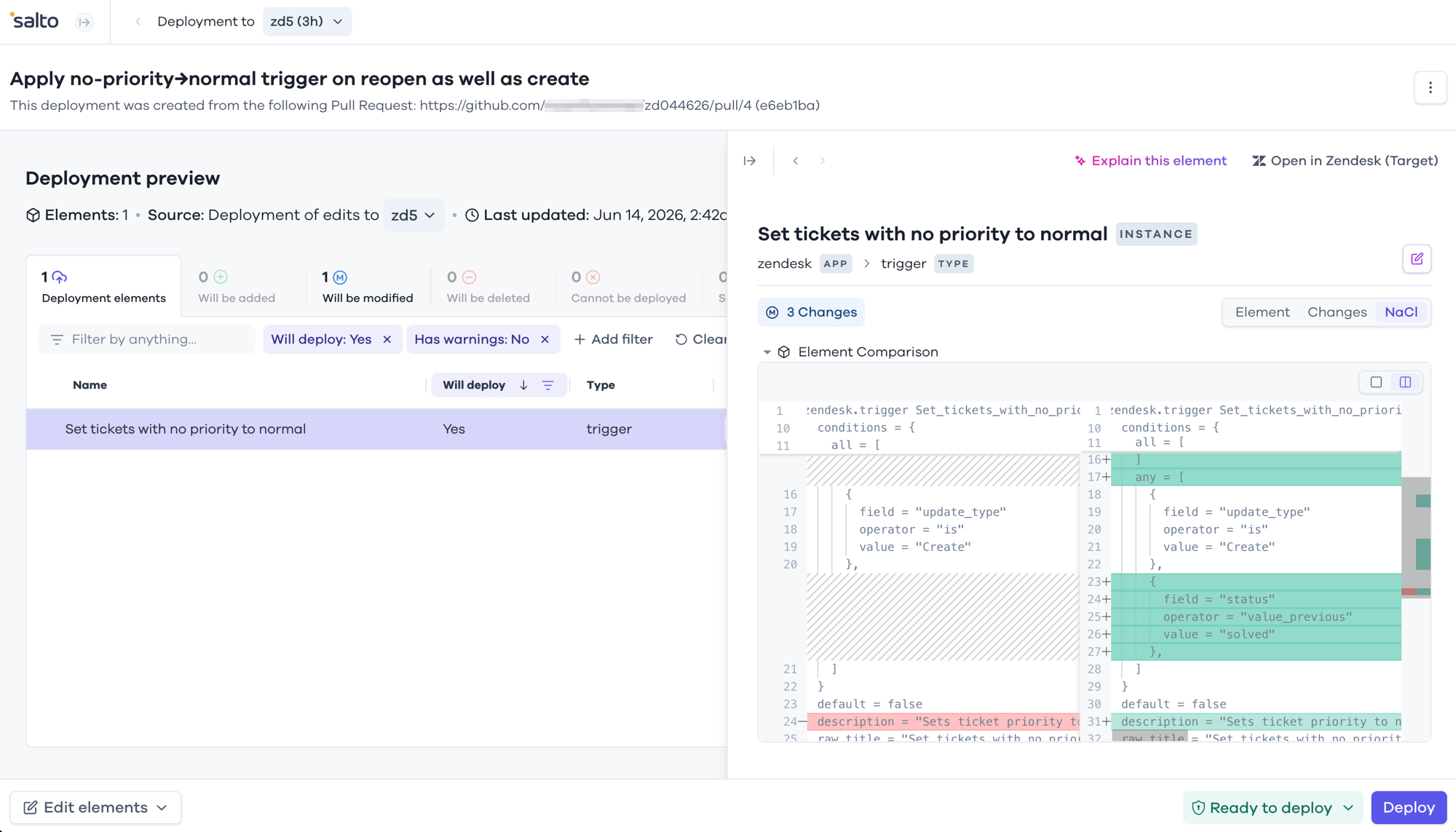
Every step is recorded, every step is reversible, and a human signs off on every change that reaches your instance.
Zendesk has spent its AI budget on your customers, and that is fine, your customers matter. But the person keeping the instance running, the one who inherited 500 triggers and a macro list in the thousands, has been handed nothing. Configuration as code, an agent that understands it, validations that check every change, and a deploy flow that keeps you in control: that is what AI for the admin actually looks like. If you want to see it on your own instance, try Salto at salto.io.

WRITTEN BY OUR EXPERT
Knuckles
Chief Content Beaver
Knuckles is a curious Business Engineer who loves to explore all things business applications.


© Copyright Salto 2026 | Various trademarks held by their respective owners
Salto for
Zendesk
Zendesk
SHARE
Knuckles
June 9, 2026
5
min read
Every conversation about Zendesk and AI lately is about your customers. Answer bots that deflect tickets, reply suggestions for your agents, copilots that summarize a conversation. It is all pointed at the front line, and most of it is sold per agent. Some of it is genuinely useful. But ask any Zendesk admin what actually eats their week, and it is not writing replies. It is the configuration.
It is the 500 triggers nobody has documented. The macro list that quietly grew into the thousands. The change you are nervous to make because you cannot see what depends on what. The new hire who needs to understand an instance that lives only in one person's head. That work is unglamorous, it is constant, and it is exactly the kind of thing AI is good at. And almost no one is pointing AI at it.
This is the AI Zendesk admins actually want: not another feature for your customers, but an assistant for the person who has to keep the whole instance running. Here is what that looks like, and how to use it without putting your instance at risk.
The AI Zendesk puts in front of you is customer-facing and metered. You pay for it per agent, and if you have ten agents, you buy ten seats of it. Admins in the community have been blunt about the results, calling the drafted replies underwhelming and the tone features filler. Whether or not that is fair, it misses the point: none of it helps you manage the configuration.
The admin side has the opposite problem. There is no shortage of work AI could take off your plate, and no tool offering to do it: understanding what is in the instance, checking what a change will break before you make it, cleaning up config that has not done anything in years, editing hundreds of macros without hundreds of clicks. This is the gap, and it is where AI is most valuable.
Four kinds of admin work map almost perfectly onto what a capable AI agent does well.
None of this is customer-facing. None of it is priced per agent. It is the boring, high-stakes work that keeps a Zendesk instance healthy, and it is finally something you can hand off.
Here is the catch. An AI agent is only as good as the context it has and the feedback it gets. Point it at the Zendesk Admin UI through the API and it is working blind, one object at a time, with no way to see how anything connects. That is how you get confident, wrong answers.
At Salto, we represent your entire Zendesk configuration, including triggers, automations, macros, views, forms, fields, groups, and SLA policies, as code, in a readable language we call NaCl. Every relationship between elements is explicit in the text.
This changes what the agent can do, for two reasons. First, context: the whole instance is in the one format AI understands best, with the connections spelled out, so when you ask what depends on a trigger, the agent follows the references instead of guessing. Second, a feedback loop: Salto runs Zendesk-aware validations on every proposed change and catches broken references and dependency problems immediately, so the agent corrects its own mistakes before you ever see the result.
Better context plus faster feedback is why the same agent that flails against the API does genuinely useful work against your configuration as code.
The number one objection admins raise about any tool that touches their config is trust. Would you let a third-party app, let alone an AI, read and change your instance? It is the right instinct.
The safe pattern is to never give the agent the keys. It works on your Salto workspace, a versioned copy of your configuration, not on your live Zendesk, and it holds no Zendesk credentials. Every change it proposes is a readable diff that a human reviews and approves before anything is applied. Changes deploy through Salto's normal flow, with full history and one-click rollback. The agent can see everything and change nothing on its own.
Say you want to disable a trigger you are not sure is still doing anything. Before you touch it, you ask the agent: what would break if I disabled the "Set tickets with no priority to normal" trigger? In seconds it traces a dependency the Zendesk UI never shows you. The trigger sets new tickets to normal priority, and your first-reply-time SLA policy only applies to normal-priority tickets. Disable the trigger and that SLA quietly stops applying to every new ticket, with no error and nothing turning red.
Now you know the trigger is load-bearing, so instead of disabling it you harden it. You tell the agent to make it also apply to reopened tickets, not just newly created ones, so a reopened ticket with no priority still picks up the SLA. The agent works out how this workspace expresses a reopen, edits the trigger's conditions, runs the validations, and opens a pull request, all without touching your instance.
You review the exact edit in Salto before anything happens. The trigger's new condition shows up as a clean diff, the validations are green, and nothing reaches your instance until you click Deploy.
Every step is recorded, every step is reversible, and a human signs off on every change that reaches your instance.
Zendesk has spent its AI budget on your customers, and that is fine, your customers matter. But the person keeping the instance running, the one who inherited 500 triggers and a macro list in the thousands, has been handed nothing. Configuration as code, an agent that understands it, validations that check every change, and a deploy flow that keeps you in control: that is what AI for the admin actually looks like. If you want to see it on your own instance, try Salto at salto.io.
© Copyright Salto 2026 | Various trademarks held by their respective owners


